

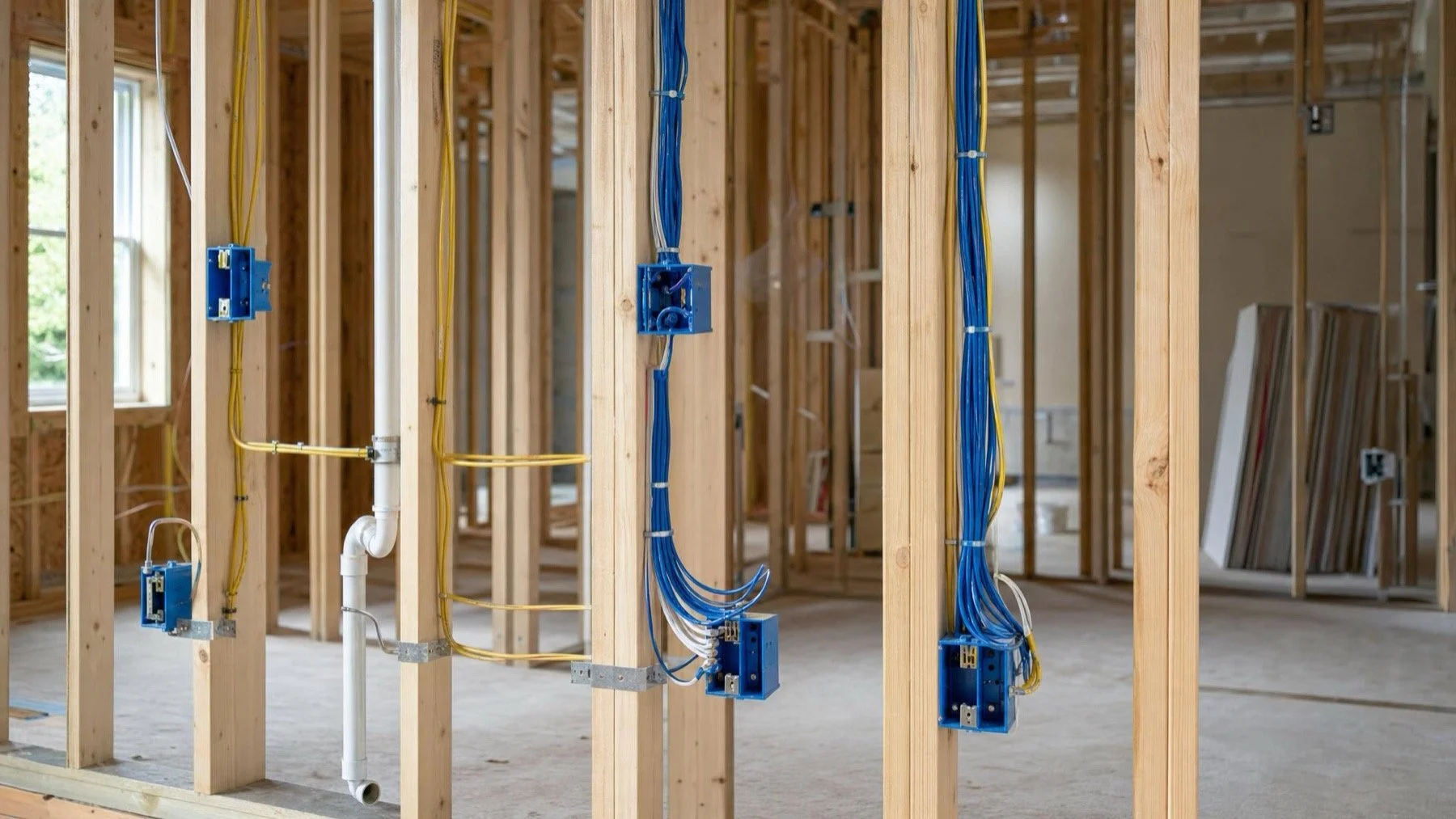
Most smart devices talk over wireless, but they still need the right power, the right boxes and sometimes a cable. Those are easiest to add before the drywall goes on.
You are opening walls for a kitchen, a basement or a whole floor, and you know you want smart switches, a video doorbell and a stronger network. Smart home wiring is the part of that wish list that has to happen now. The devices can be bought later, but the neutrals, boxes, low voltage cable and power locations behind them are far easier to install while the studs are exposed.
This guide covers what to plan at rough in, so the smart features you add next year do not mean cutting into a finished wall. We plan this wiring for renovations across Toronto and the GTA. The checklist below is the same one we walk through with homeowners and their contractors.
Switch boxes are where many smart upgrades stall
Many smart switches and dimmers need a neutral wire in the switch box to power their electronics. Older switch loops often have only a hot and a switched wire, which is why smart switch installs in existing homes so often stop halfway. Running a neutral to every switch location during the renovation solves that for good.
Smart switches are also bulkier than a standard toggle, and a box packed with wires plus a large device is hard to close safely. Deeper boxes are a simple choice at rough in and a frustrating fix afterwards. Where several switches sit together, plan the gang count with the actual devices in mind.
Power and cable for the devices you will add later
- Thermostat. ESA's smart home tips point out that wireless thermostats can require a specific voltage and may need extra wiring. Run a thermostat cable with spare conductors to the location and confirm what your heating system needs.
- Doorbell and cameras. Hardwired cameras and doorbells need power where they mount. Mark each spot on the plan and run power or low voltage cable to it.
- Network. A wired connection to the main television, the office and the router location makes wireless devices more dependable. Run network cable while you can, and keep it separated from power cable where the plans call for it.
- Lighting controls. Decide where scenes and multi location dimmers will be controlled, so the boxes go in the right places the first time.
We install smart lighting systems such as Lutron Caseta and Philips Hue as part of our lighting work. The planning above is what makes those installs quick. Our electrical wiring installation service in Toronto handles the rough in for all of it.
Order of work: smart planning meets the inspection
The sequence matters. Decide device locations with your designer or contractor, then the electrician roughs in boxes, power and cable, then the inspection, then insulation and drywall. Do not let drywall go up before the required electrical inspection. ESA guidance places the rough in inspection after branch circuit wiring and boxes are installed and before any wiring can be concealed. Our guide to electrical renovation planning covers the full sequence.
While the panel is being worked on, it is also a good moment to consider whole home surge protection, since a house full of connected devices has more electronics to protect.
Network cable is often run by the same crew, but the power side is electrical work. If you hire it out, ESA guidance says the contractor must by law be a Licensed Electrical Contractor. If you own and live in the home and do it yourself, ESA guidance still requires a notification of work.
Electrical questions homeowners ask
What is smart wiring for homes?
Smart wiring usually means preparing a home's electrical and low voltage cabling for connected devices. That includes neutrals at switch boxes, deeper boxes, power for cameras and doorbells, thermostat cable and wired network runs.
Can smart home wiring be added to an existing home?
Many smart devices can be added to an existing home, especially wireless switches and plugs. Adding neutrals, new boxes or network cable to finished walls is possible but slower and messier, which is why a renovation is the best time to do it.
Safety first next step: plan before rough in
Walk each room with your floor plan and mark switches, cameras, the doorbell, the thermostat and where the router will sit. Share that plan before rough in, and we will place the boxes, neutrals and cable so the walls only have to close once.
Book a KoljiBros assessment
Send us your renovation plan and device wish list, and we will map the boxes, power and cable before the walls close.
Kolji Bros. Electrical is a Licensed Electrical Contractor, ECRA/ESA #7015453.